






Nippy Marketer GANTT chart
With Nippy GANTT you can manage all aspects of the processes in your organization to better align activities.
In this article you will learn about:
- Structure and elements of Nippy GANTT
- Manage activities periods in GANTT
- Create predecessor tasks and dependency in GANTT
- Create a milestone activity in GANTT
GANTT elements
Nippy Marketer GANTT consist of two major elements - a tree grid with all activities expandable in rows and a bar chart area with bars visualizing the start, end, and duration of an activity's period.
- Rows
Rows include in tree order all campaigns, projects, and tasks. These could be expanded separately or all to reveal further information and for management.
Every activity can be easily recognized as campaign, project or task through their icons.
Before the name of each activity, Nippy indicators show if the activity is in progress, paused, completed or if no indication - not started.
The three dots after the activities' names allow for quick access to its management - run, pause, edit, complete, or collaboration options.
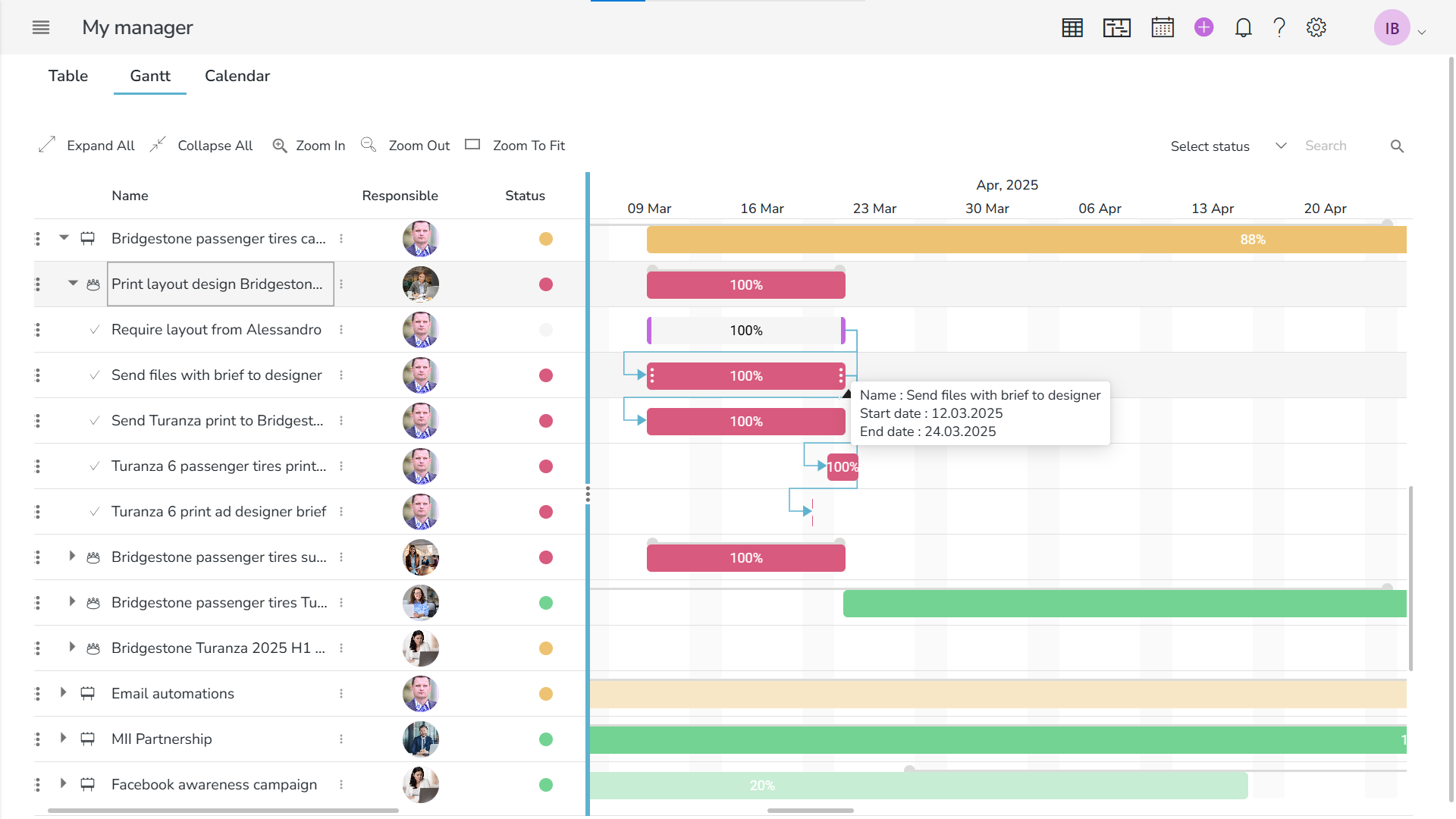
- Columns
In Nippy GANTT the columns provide data data on responsible, activity status (red, orange, yellow, green, white), start date, and end date of all activities.
When clicking on a responsible's avatar, you can access all collaboration options with your team member.
When hovered over column's heading, you see the three dots with options for filtering, sorting, hiding columns, autofit one or all columns.
Manage activities in GANTT
The enhanced manual management model of the Nippy GANTT allows you to choose the appropriate for your marketing process approach.
By default, items are independent of each other so that you could manage activities' periods without automatically affecting all tasks in a project.
Yet, if you want to establish dependency between tasks by establishing predecessors, Nippy GANTT will validate the change of a task's period and adapt accordingly the dependent tasks. You can set predecessor task in a task form or drag and drop a connection between tasks in GANTT.
Set predecessor tasks in Nippy
A predecessor task in Nippy is a task that is best executed before another task. By default, in Nippy GANTT tasks dependency is Finish-Start - you need to finish the predecessor task before you work on the dependent one.
In Nippy GANTT you can create a task dependency by hovering on the side of the task until you see a grey circle, click on it and drag the appearing line to the task, with which you want to create a dependency.
Or, you could open a dependent task form and choose a predecessor task from any of the project's task.
Change activity's period in Nippy GANTT
You can visually change tasks' periods in GANTT with simple dragging of the activity's bar in the chart.
You can expand the bar to change the start or end dates to reduce or increase the acitivity's period.
Or you can drag the whole bar to keep the chosen period length but change when the activity will be executed.
Changes in GANTT are reflected in all Nippy.
Create a milestone task in Nippy GANTT
A milestone task has a duration peiod of zero and is represented like this ♦. You can create a milestone task in Nippy GANTT by dragging the start or end date of the task until period becomes zero.