






How media response metrics are calculated in Nippy PR
With Nippy you can automatically extract data and calculate the outreach response metrics for every media representative and media outreach type - press release, interview pitch, and press event.
In this article you will learn how media outreach metrics are calculated and how you can manage media response in medida profiles.
How to determine email data for press release, interview, or media event
Nippy Emails are fully integrated with Nippy work management. To start with an email, you create an email task. When creating the email campaign, you must determine if it is a press release, interview, media event, or any combination of the above.
- Go to the main menu My emails.
- When in the email management module, click on Create email
- Fill-in the required information in the email task form. Email name, responsible, and project are required fields. Nippy tasks must be part of a project. More on how to create projects here.
- In the Email type tag selector, choose any combination of tags to determine the email's purpose - a press release outreach, an interview pitch, or press event invitation.
- Click Design email. This will lead you to the email creator page while Nippy launches the task and starts automatically to record the actual time worked on this email. If you choose Save, the task and its email will be saved as a draft. Both can be launched - the task from Drafts in Grid or GANTT; Email from the email management module. If you choose Launch, the task will be launched to active (will appear in your Marketing Day dashboards), but because you don't work on the email, actual time of work will not be recorded.
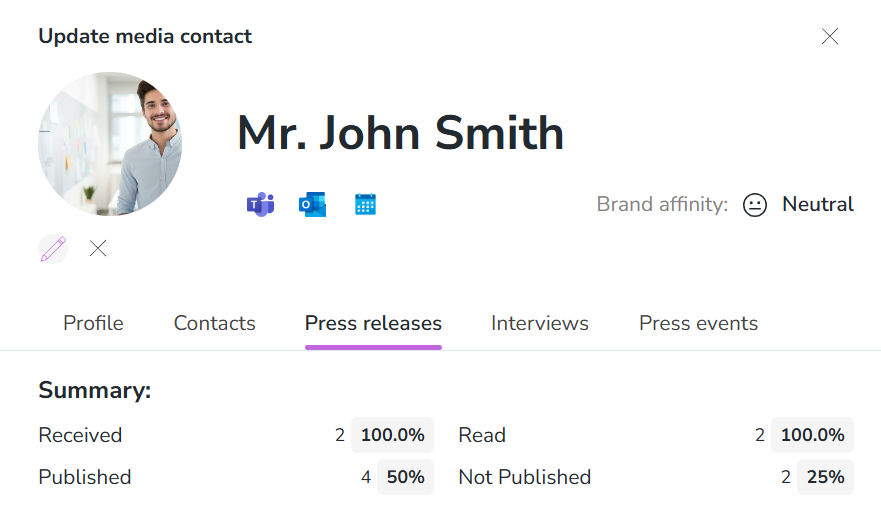
Nippy press release outreach metrics
There are five press release outreach metrics:
Received:
- Total number delivered emails (automatic)
- % ot total sent emails
Read:
- Total number opened emails (automatic)
- % of delivered emails
Published:
- Total number (set manually)
- % of delivered emails
Media published (this is a press releases, sent to a media representative, but it was not published by the pitched reporter, but by another reporter or by the media):
- Total number (set manually)
- % of delivered emails
Not published:
- Total number (set manually)
- % of delivered emails
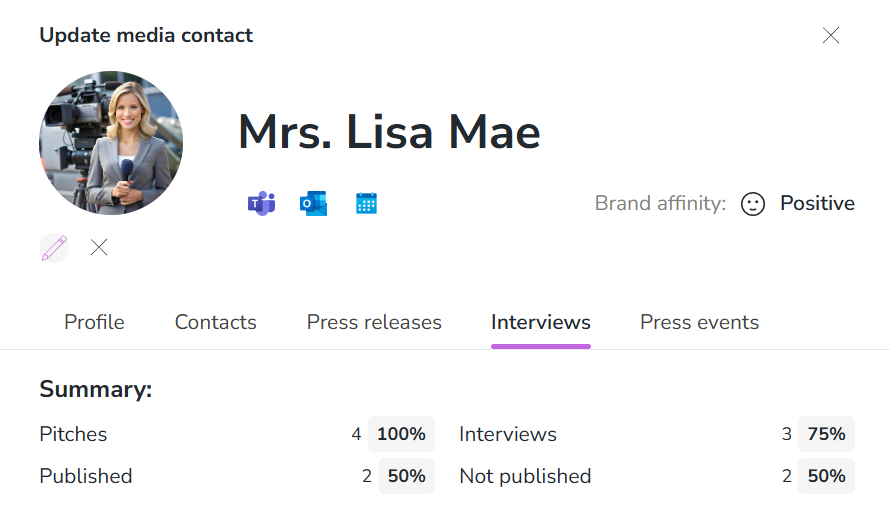
Nippy Interviews outreach metrics
There are four interviews outreach metrics:
Pitch:
- Total number delivered emails (automatic)
- % ot total sent emails
Interviews (conducted interviews):
- Total number of conducted interviews (set manually)
- % of number of interview pitches
Published:
- Total number (set manually)
- % of the number of conducted interviews
Media published (this is a press releases, sent to a media representative, but it was not published by the pitched reporter, but by another reporter or by the media):
- Total number (set manually)
- % of the number of conducted interviews
Nippy Press events outreach metrics
There are three press events outreach metrics:
Invited:
- Total number delivered emails (automatic)
- % ot total sent emails
Confirmed:
- Total number of confirmed attendance (set manually)
- % of number of ivited
Attended:
- Total number (set manually)
- % of the number of invited

How to manage media response
1. Go to the Media database, open the media representative profile by clicking Edit next to their name.
2. Go to Press releases, Interviews, or Press events tab.
3. Add a new or choose from available press releases, interview, or event (when a user has added a PR activity name, it will appear for all users, part of the tenant).
4. Choose the corresponding tag from the Status field on the right.
5. Click Save.